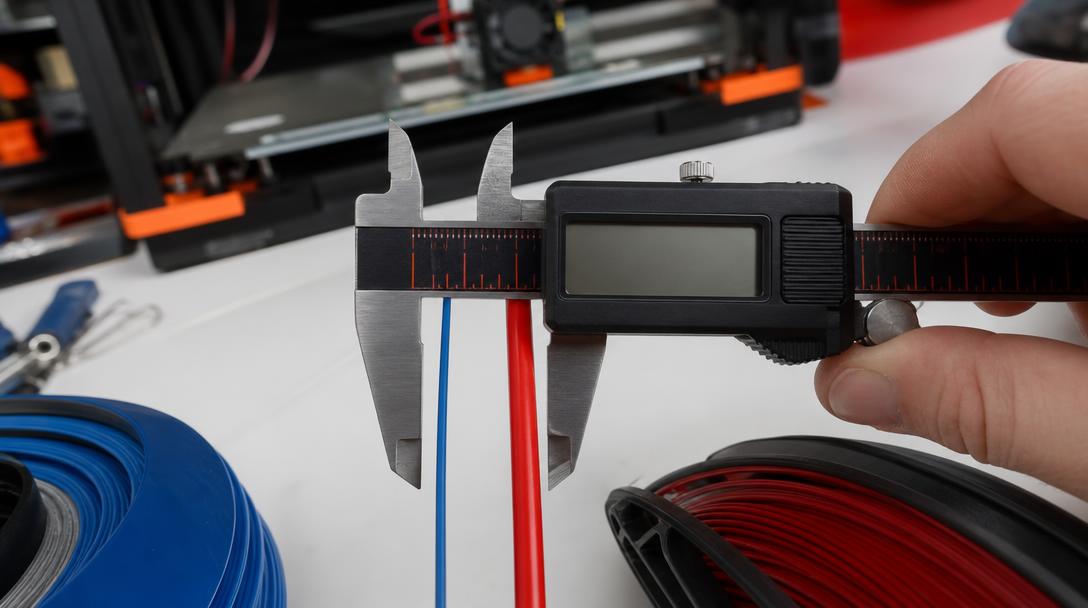
Filament Diameter Tolerance: 1.75 mm or 2.85 mm?
Filament diameter tolerance and nominal diameter should be considered together when assessing feed compatibility in FDM 3D printers. Check the diameter specified by the printer manufacturer: 1.75 mm filament cannot be loaded directly into a system designed for 2.85 mm filament. How consistent the filament remains along the spool is just as important as its nominal diameter. Keeping these two measurements distinct helps prevent choosing the wrong spool or forcing filament with an incompatible diameter into the printer.
The key difference between 1.75 mm and 2.85 mm
These two measurements refer to the filament’s nominal diameter. The printer uses a feed path, drive gear, and melt-flow setup designed for that diameter. Choosing filament with a different diameter is not simply a matter of whether the spool fits in the printer: the feed mechanism may not grip the filament properly, and the material flow calculated by the software may not match the actual flow.
So rather than looking for a generally “better diameter,” check the device’s technical documentation. Even if the filament diameter is compatible with the printer, print issues can still occur; how consistent the diameter remains along the spool can also affect the results. Before buying a new spool, confirm the supported diameter in the printer’s manual, the manufacturer’s technical specifications, or the filament-routing information on the device. The spool label alone does not prove that it is compatible with your printer.
Why does diameter tolerance matter?
Filament diameter tolerance describes how much the actual measurement can deviate from the nominal value specified by the manufacturer. If the filament becomes noticeably thicker or thinner at different points, the amount of material entering the extruder may vary. This variation can cause inconsistent extrusion or surface irregularities, or make flow settings harder to interpret. However, do not assume that every surface defect is caused by filament diameter alone; also check for clogs, issues in the feed path, temperature, and slicer settings.
Check the product information for the tolerance value and measurement method specified by the manufacturer. When comparing different products, make sure the measurement units and the way tolerance is expressed are the same. If taking measurements, do not overtighten the calipers; measure the filament at different angles and at several points along the spool. If the filament is oval, a measurement taken in just one direction may give a misleading diameter. A reading from a single point does not show how consistent the entire spool is; measurements from several points provide a more useful indication.
If you see a noticeable difference between measurements, do not immediately try to compensate by changing the printer settings. First, check that you are using the calipers correctly and that the filament has not been squeezed in a way that could affect the measurement. Then check the nominal diameter and tolerance values in the product information. If the issue persists, assess the condition of the filament, the feed path, and the manufacturer’s specifications together. This approach reduces the risk of confusing diameter variation with another mechanical or settings-related issue.
When buying filament and troubleshooting
- Confirm the nominal diameter supported by your printer in its manual; do not load a spool without checking the value on its label.
- Check whether the product description specifies a diameter tolerance, and compare products using the same unit of measurement.
- If extrusion is inconsistent, do not treat filament diameter as the only possible cause; also check the feed, nozzle clogs, and print settings.
- When using a new spool, also confirm the material and its appropriate settings range; diameter compatibility does not mean the material settings are correct.
Filament compatibility is easier to assess when you consider the part’s dimensions, operating conditions, and material choice together. To compare the properties of different filament types, explore our 3D printing material options, and estimate the production cost of your model file on our 3D printing price calculator page. For guidance on why print-ready dimensions and clearances matter in a design, see our tolerance guide for interlocking parts.



 Türkçe
 العربية
 Русский
 فارسی
فارسی Deutsch