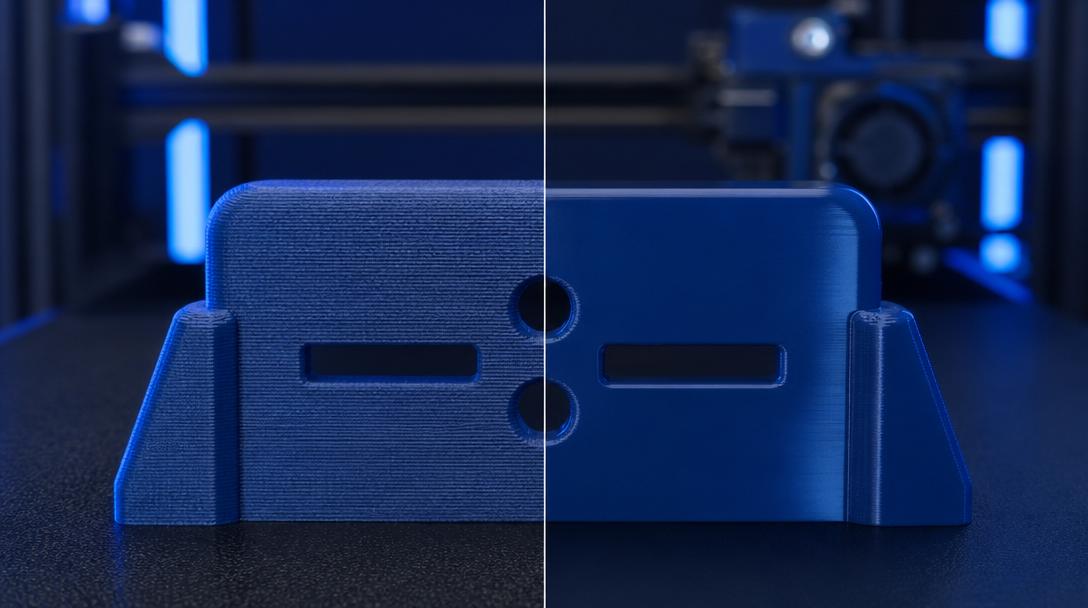
What Is the Ironing Setting? The Slicer Feature That Makes Top Surfaces Glass-Smooth
In 3D printing, layer lines on the top surface can negatively affect the appearance of a part, especially on flat and wide areas. Fortunately, the ironing setting found in slicer software can largely eliminate this problem. So what is ironing, when should it be used, and how do you dial in the right settings? In this article, we explain in full detail this feature that elevates top surface quality to a professional level.
What Is Ironing and How Does It Work?
Ironing is a process in which the slicer moves the nozzle over the same surface again after completing the final layer, but without continuously feeding filament as in a normal print. The hot nozzle, along with a very small amount of molten filament, lightly presses and smooths the existing surface — just like an iron smoothing out fabric. As a result, layer lines largely disappear and a smooth, slightly glossy top surface is achieved.
This feature stands out especially in the following situations:
- Flat and wide top surfaces: Parts such as box lids, signs, and instrument panels.
- Visually driven products: Prototypes for sale, exhibition models, and gift items.
- Reducing post-processing time: Decreases the need for sanding and primer, increasing production speed.
Which Slicer Software Supports It?
Ironing is now available in virtually every popular slicer. In Cura it can be enabled with the “Enable Ironing” option; in PrusaSlicer it appears under the “Ironing” heading; and in OrcaSlicer it is found in the “Ironing Parameters” section. Bambu Studio also supports the same feature. Regardless of which software you use, you can expect to have access to the ironing setting.
The Right Ironing Settings
Three parameters require attention for a clean result:
Ironing Speed
This is the movement speed of the nozzle during ironing. Too slow (10-20 mm/s) leads to burning and over-melting, while too fast (80+ mm/s) results in insufficient smoothing. Generally 30-50 mm/s is the ideal range.
Ironing Flow Rate
This is the amount of filament extruded during ironing. It is typically set between 10-20%. For PLA, 15-20% gives cleaner results; for PETG, 10-15% works better. Too high a flow rate causes surface blistering and excess material accumulation.
Ironing Line Spacing
This is the distance between ironing passes. It should be equal to or slightly narrower than the nozzle diameter. For a 0.4 mm nozzle, a spacing of 0.2-0.3 mm is ideal. Wide spacing leaves visible lines, while narrow spacing wastes time unnecessarily.
Which Materials Work Best?
Ironing delivers the best results with PLA and PLA+. It can also be tried with PETG, though the material’s sticky nature may leave slight marks on the nozzle. ABS and ASA behave similarly; however, the improvement may not be as pronounced as with PLA. Ironing is not recommended for flexible filaments such as TPU, as the nozzle may distort the soft surface rather than flatten it.
Limitations of Ironing
- It increases print time — a noticeable time difference may occur on wide surfaces.
- It only affects the topmost layer; it provides no benefit for side surfaces or lower layers.
- On complex geometries, the nozzle may leave unwanted marks in recessed areas.
- It produces a slight increase in surface gloss, so it may not be preferred when a matte finish is desired.
To optimize your ironing settings, we recommend experimenting with speed, flow, and spacing values on a small test piece to find the best combination. This way you save time and achieve a professionally finished surface.
If you need a quality FDM printing service for your project, you can see your cost in seconds with our instant price calculator, and choose the most suitable option from our 17 different material options.


 Türkçe
 العربية
 Русский
 فارسی
فارسی Deutsch