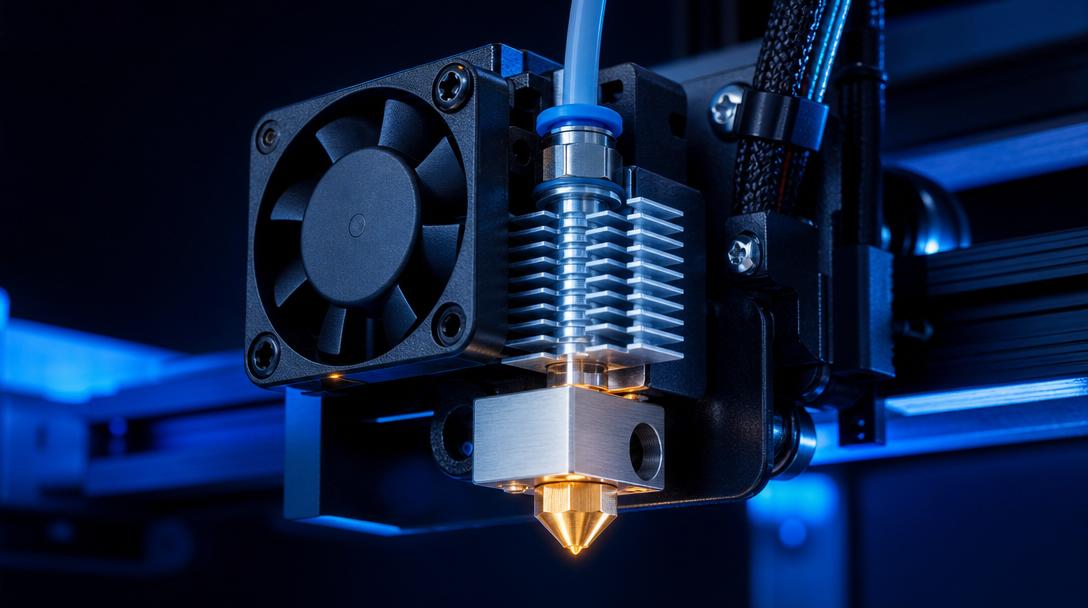
What is Heat Creep? Hotend Heat Creep Symptoms and Solutions
Have you ever been printing with PLA when, mid-print, as you progress toward the upper layers, filament suddenly stops coming out of the nozzle? The extruder gears are turning, you hear the motor, but the part remains unfinished. Most users initially suspect a nozzle clog, but the real culprit is often heat creep occurring in the upper section of the hotend. In this article, we explain what heat creep is, what symptoms it shows, and most importantly, how to prevent it step by step.
What is Heat Creep?
Heat creep is the backward spread of heat from the hotend’s heater block toward the cooling zone. Under normal operation, the hotend fan blows air over the cooling fins, creating a clear hot-cold boundary between the heater block and the extruder. Thanks to this boundary, filament melts only in the nozzle area, while the solid section transmits the pushing force to the extruder gear. When the fan fails, the cooling fins become clogged with dust, or the ambient temperature rises too much, this thermal barrier disappears. Heat travels upward past the cooling block, even toward the heatbreak tube. The filament melts and swells here, and the extruder can no longer push it toward the nozzle.
Low-temperature filaments like PLA are especially prone to heat creep because they reach their melting point closer to the cooling zone. With higher-temperature filaments like PETG and ABS, the problem usually works in reverse; insufficient cooling triggers clogging through heat creep rather than affecting layer adhesion.
Heat Creep Symptoms
Catching heat creep early is critical to saving your print. Here are the signs to watch for:
- Extrusion stopping at a specific point in the print: The first 20-30 layers go smoothly, then filament output from the nozzle suddenly stops.
- Skipping or grinding sound from the extruder gears: The motor turns but filament doesn’t advance; the gears wear down the filament (grinding).
- Swollen filament tip after a cold pull: At the end of the filament you remove using the cold pull method, you’ll see a visibly thickened section wider than the heatbreak diameter.
- Recurring clogs on long prints: If clogging occurs at the same point especially on PLA prints lasting more than 3-4 hours, heat creep is the most likely culprit.
How to Prevent Heat Creep
The heat creep problem is usually solved with a few simple measures. By applying the following steps in order, you can find the source of the issue.
1. Check the Hotend Fan and Heatsink
The most common cause of heat creep is fan failure. Check whether the hotend fan is spinning during printing; if the fan isn’t turning or you hear bearing noise, replace it. Dust accumulated between the heatsink fins significantly reduces airflow. Regular cleaning with compressed air prevents this problem at its source. If you work in an unfiltered workshop, we recommend doing this cleaning once a month.
2. Review Temperature and Retraction Settings
Keeping the nozzle temperature unnecessarily high significantly increases the risk of heat creep. The general range for PLA is 190-220 °C; staying closer to the lower end of the range helps maintain the hot-cold boundary. Additionally, excessively long retraction distances can pull molten filament into the cooling zone, accelerating clogs. Limit retraction distance to 1-2 mm on direct drive systems and 4-5 mm on Bowden systems. Keeping retraction speed in the 25-40 mm/s range is also a good starting point.
3. Manage the Printer’s Ambient Temperature
If you’re using an enclosed cabinet and printing PLA inside, the hotend fan’s efficiency drops when the internal temperature exceeds 35 °C. In this case, cracking the enclosure door open or adding an extra exhaust fan inside helps. If your workshop temperature exceeds 30 °C during summer, replacing the hotend fan with a more powerful model is the most reliable way to prevent heat creep.
4. Verify the PTFE Tube and Heatbreak Connection
In PTFE-lined hotends, any gap between the tube and the nozzle allows molten filament to seep into the gap, leading to clog-like issues. After changing the nozzle, make sure the PTFE tube is fully seated against the nozzle. In all-metal hotends, it’s critical that the inner surface of the heatbreak tube is clean and smooth; carbon buildup inside increases friction and can produce heat creep-like symptoms. For more detailed information on this topic, check out our guide: How to Clean a Clogged Nozzle.
Although heat creep may seem confusing at first, it can be largely prevented with regular fan maintenance and proper temperature management. When you apply these steps, you’ll see a noticeable improvement in your print reliability. If you’d rather not deal with it on your own printer and are looking for a professional solution, send your project to Ucuz3D. With our FDM 3D printing service, we produce and deliver your parts on industrial equipment with the correct settings. If you’d like, you can see your cost in seconds on our instant price calculator page.


 Türkçe
 العربية
 Русский
 فارسی
فارسی Deutsch