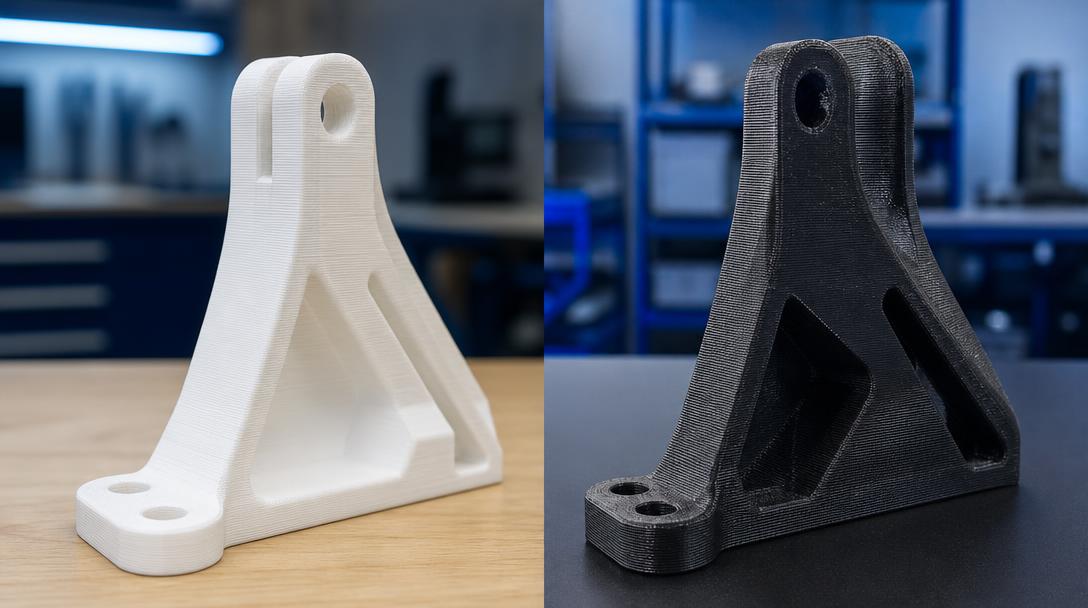
PLA or Glass-Fiber-Reinforced Filament? Easy Printing for Lightweight Parts or Greater Rigidity?
PLA or glass-fiber-reinforced filament? This choice is about more than comparing the strength of two spools: PLA is often preferred for fast, easy prototyping, while glass-fiber-reinforced filament is considered for technical parts where rigidity and dimensional stability are important. The right choice depends on evaluating both the loads on the part and its operating environment.
What needs do these two materials address?
PLA offers a practical starting point for low-complexity prototypes, enclosures, and visual inspection parts. It is generally easier to print, and good results are possible across a wide range of printer settings. However, the risk of deformation in warm environments should be considered when operating conditions matter. PLA should not be chosen by default for a part exposed to continuous heat or heavy mechanical loads.
Glass-fiber-reinforced filament is an FDM material made by adding short glass fibers to a polymer matrix; the printed part is not made of solid glass. The fiber reinforcement can help produce a part that is more rigid in some respects and more dimensionally stable. However, the results depend on the filament formulation, print orientation, geometry, and manufacturer settings. Being “reinforced” does not make a part unbreakable in every direction; interlayer bonding and load direction still matter.
Rigidity, printability, and surface finish
If you want to reduce the bending of a fixture, a glass-fiber-reinforced option may be worth considering; but don’t confuse rigidity with impact resistance. A more rigid part may not tolerate sudden impacts as well as you expect. Thin walls, sharp corners, and loads perpendicular to the layers pose design risks with both materials. If the part’s function is critical, it is safer to start with a small sample or test a suitable geometry.
Glass-fiber-reinforced filaments can be more abrasive to the nozzle. Longer production runs may require a suitable wear-resistant nozzle and correct machine settings; a standard soft brass nozzle may wear faster. For this reason, PLA may be more economical and hassle-free for a small, one-off prototype that does not bear loads. You can explore the available options and materials on our printing materials page.
- Quick visual prototype or general-purpose part: in most cases, start with PLA.
- Technical geometry where rigidity and dimensional stability matter: consider the glass-fiber-reinforced option.
- Plan ahead for the need for a wear-resistant nozzle, part size, and print orientation.
Choose based on the part’s function
There is no universal winner between these two filaments. First, note the part’s temperature, load, impact, and tolerance requirements; then compare printing costs and ease of production. Glass-fiber-reinforced filament should not be chosen just because it sounds more technical, and PLA should not be considered suitable for every job just because it is easy to print. You can evaluate your design’s suitability for FDM production alongside our 3D printing service options.
For per-gram costs and affordable 3D printing prices, visit the pricing page; you can also upload your STL file to get an instant quote. Sharing the part’s operating conditions makes it easier to determine the right material.
Why are geometry and a test print important?
Consider material selection for each individual part. A wide, thin plate, a short mounting tab, and an enclosed housing do not experience the same types of stress. Interlayer bonding, print orientation, and the number of walls can significantly affect actual strength. Even if a glass-fiber-reinforced material feels more rigid, a poorly designed part may fail under tensile loads perpendicular to the layers. Printing a quick dimensional prototype in PLA and checking the critical area, then switching to a reinforced option if needed, is a practical way to balance cost and time.
Printing a small sample of each material with the same geometry provides a more meaningful comparison than a general list of properties. For clips, thin walls, or snap-fit connections in particular, verify design tolerances on the actual printer.



 Türkçe
 العربية
 Русский
 فارسی
فارسی Deutsch