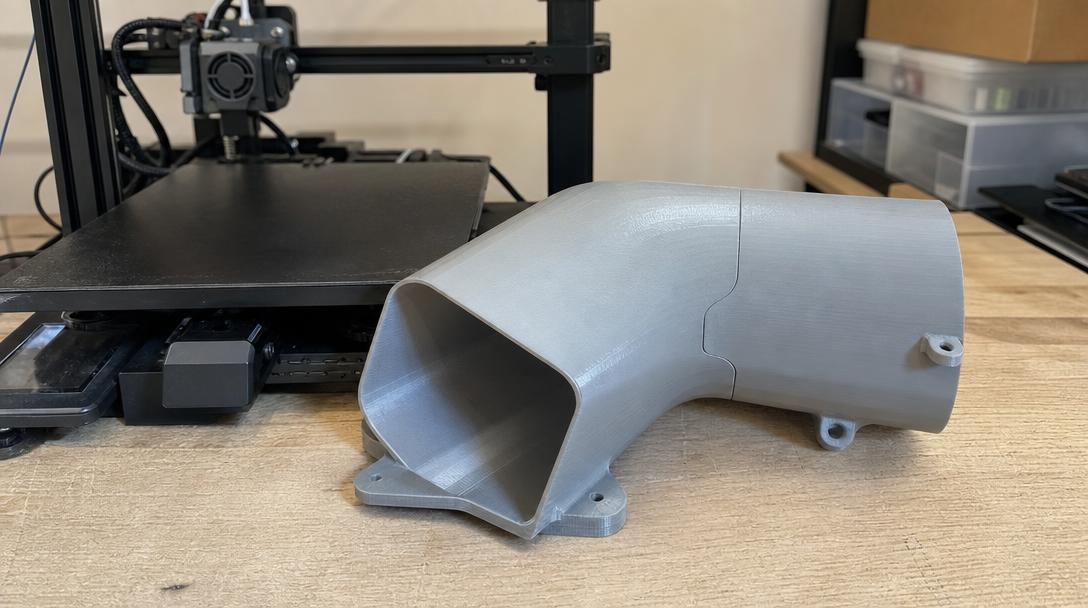
Large-Size 3D Printing: What Is the Maximum Size? Can Large Parts Be Printed in One Piece?
Large-size 3D printing depends on the printer’s build volume and the part’s geometry; there is no single size that applies to all printers. If a part does not fit within the build area, the model can be split at suitable points and assembled. That is why looking only at the part’s longest dimension is not enough; its orientation and the space it occupies on the build plate must also be considered.
What determines print size?
On FDM printers, build volume is usually given as dimensions along the X, Y, and Z axes. Whether a part will fit depends not only on its length, but also on the area it occupies on the build plate, its height, and its print orientation. Rotating the model can sometimes make it possible to print the part in one go; however, changing its orientation can affect the need for supports, surface quality, and how loads are carried between layers.
Also, having the part’s outer dimensions exactly match the build volume is not always practical. Clearance may be needed for edge margins, bed adhesion, and movement that can occur during printing. For this reason, compare the model’s dimensions with the printer’s usable area when deciding. If the part needs auxiliary structures such as supports or a brim, these may also take up some of the usable area.
Print in one piece or split it?
Printing in one piece can be an advantage for parts that should have no seams, need to be used as a whole, or are difficult to align. On the other hand, with large models, print time, the potential cost of a failed print, and support requirements can all increase. Splitting the part can make production easier and help it fit within the build area; however, the design of the joints, assembly, and the loads the joint will experience in use must all be taken into account.
- If appearance matters: Plan ahead for surfaces where the seam will be visible and for any post-processing required.
- If the part will bear a load: Design the joint’s orientation and connection area to suit the direction of the load; consider the conditions of use before relying on adhesive alone.
- If the part is very long: Check the effects of rotating the model on fit, supports, and strength together.
The decision to split a part should not be based only on the printer’s build volume. The part’s operating environment, access for assembly, and whether it may need to be taken apart and reassembled are also important. For example, with a part that will be moved frequently, easy alignment of the connection may be a priority; for a product that will remain stationary, how the joint behaves under load may matter more.
Preparing a large part for printing
First, clarify the part’s intended use, outer dimensions, and the loads it will be exposed to. Then inspect the CAD model or 3D file in the slicer in different orientations to check whether the part fits within the usable build area. If it does not, placing split lines on flat, broad surfaces and designing alignment pins or interlocking joints can make assembly easier. Since the tolerances of these connections may vary depending on the printer and material used, a small test part can be useful.
Before splitting the model, also check the file’s scale and unit of measurement; a file imported with the wrong units may make the part appear larger or smaller than expected. Changing the print orientation can also affect the quality of critical surfaces and the direction of the layers in relation to the part. Therefore, before making a final decision, consider the production method, assembly approach, and conditions in which the part will be used together.
If your file is ready, you can review the dimensions and material options through our [online 3D printing service](https://www.ucuz3d.com/en/online-3d-printing-service/). If you need help with your file or design, share the part’s intended use and dimensions with a [quote request](https://www.ucuz3d.com/en/urgent-3d-printing-order-form/). For decisions about connections and tolerances in models that will be split, you can also see our [guide to splitting and joining large parts](https://www.ucuz3d.com/parca-bolme-birlestirme-rehberi/).
Short answer
The maximum size that can be printed in one piece is limited by the usable build volume of the selected FDM printer. If the part does not fit, options include changing its orientation or splitting it to suit its strength and assembly requirements. Checking the dimensions and orientation of the design file in advance helps you make a more informed production decision.


 Türkçe
 العربية
 Русский
 فارسی
فارسی Deutsch