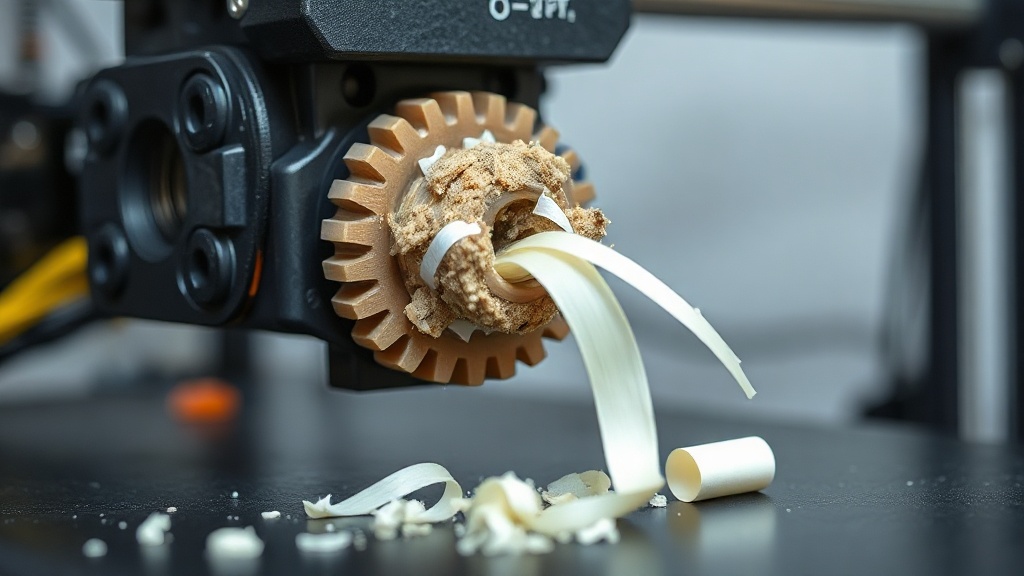
Extruder Grinding Filament: Causes and Solutions
While a print is running, if you look at the extruder and notice the gear has worn the filament down to a flat spot, it is a frustrating sight. This condition is commonly called “grinding” or extruder grinding, and it is actually not the root problem itself — it is a symptom of something else going wrong. In this article we explain step by step why the gear grinds the filament and how to stop it.
Why does grinding happen?
The extruder gear grips the filament to push it forward. When the filament cannot advance for any reason, the gear keeps spinning in the same spot and digs into the plastic, flattening it. Once there is no surface left to grip, feeding stops entirely. So the problem is usually not the gear itself — it is an obstruction somewhere in front of the filament.
Most common causes
- Nozzle clog: A partial or full blockage prevents the filament from moving forward
- Print temperature too low: Material that has not melted sufficiently resists flowing
- Print speed too high: Demanding more material than the hotend can melt
- Wrong idler tension: The extruder arm (idler) is too tight or too loose
- Heat creep: Filament swelling in the upper zone and blocking the heat break channel
Step-by-step solution
To fix grinding, first find the obstruction that is preventing the filament from advancing. We recommend following this sequence:
- First clean the plastic dust from the gear; otherwise the problem will recur
- Try raising the print temperature by 5-10 degrees within the material’s recommended range
- Test by slightly reducing print speed and flow rate
- Check whether the nozzle is clogged; perform a cold pull if necessary
- Adjust the extruder arm tension so it leaves a mark on the filament but does not slip
- If the problem persists, review the heat creep risk and inspect the cooling fan
Preventive habits
It is possible to prevent this problem from the start. Because moisture-absorbed filament flows harder than expected, store your filaments in a dry place, clean the gear regularly, and review the temperature and speed profile for every new material. These small habits make a big difference in long prints.
If you would rather skip these fine adjustments and receive your parts ready to use, you can send your model and request a quote through the quick order page. Producing with the right material and settings is our business.


 Türkçe
 العربية
 Русский
 فارسی
فارسی Deutsch