Philips’ Free 3D-Printable Spare Parts Initiative: OneBlade and More
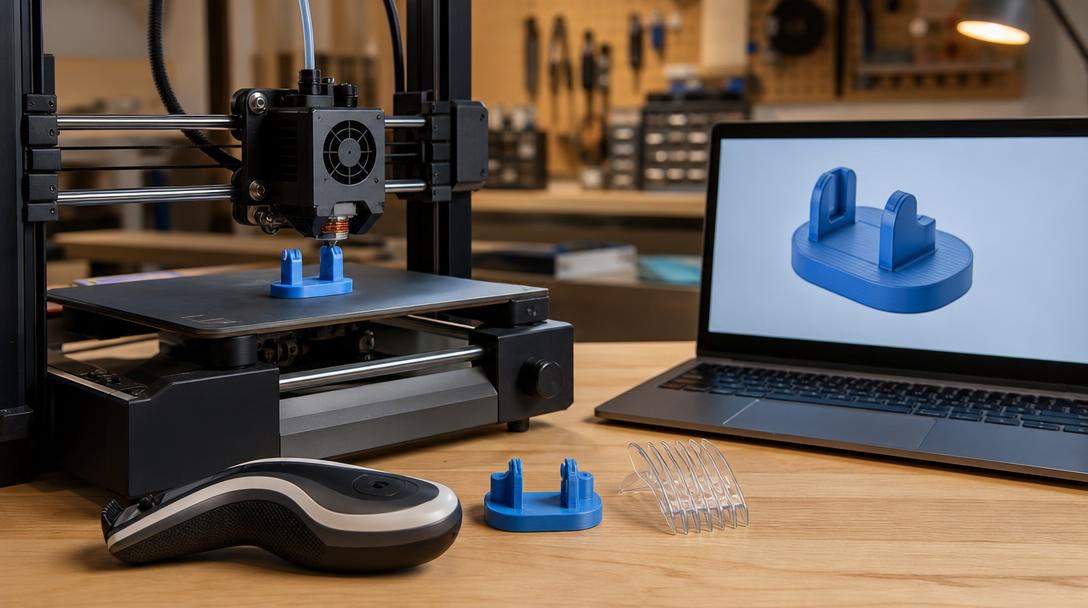
Having to replace an entire device when a small plastic part breaks can be frustrating, both in terms of cost and waste. Philips’ new approach offers a practical alternative to this problem through 3D printing. According to Notebookcheck’s report dated August 31, 2026, the company has begun offering free 3D-printable spare parts and accessory models for products such as OneBlade.
This development strengthens the approach of using a 3D printer not only to produce decorative models or prototypes, but also to extend the service life of everyday objects. The models announced by Philips include low-risk parts such as small covers, holders, or plastic accessories that can be lost during use. The basic idea is for the manufacturer to share the digital file, allowing the user to produce the appropriate part on their own FDM printer or through a printing service.
Why is the news important?
One of the biggest obstacles in spare-part production is obtaining the part’s dimensions and geometry accurately. A file prepared by the manufacturer reduces this uncertainty. Instead of measuring and redrawing the broken part or searching online for an incompatible model, the user can start with a design directly associated with the product. This creates a meaningful option, especially for products that are no longer sold or whose small accessory is not worth waiting for through a service center.
It is also important to set expectations correctly. Not every spare part is suitable for FDM printing. For cutting mechanisms, parts exposed to high temperatures, components that affect electrical safety, or connections carrying high mechanical loads, the manufacturer’s instructions and the part’s intended function must be taken into account. Sharing a model for free does not mean that every printed material will deliver the same performance under all conditions of use.
Which material makes sense for FDM printing?
For small accessories that do not carry visual loads, operate at room temperature, and do not require highly critical dimensional tolerances, PLA can be a practical starting point. If a tougher part, somewhat better temperature resistance, or greater flexibility in daily use is needed, PETG can be considered. However, the choice should not be based solely on the material name; the number of walls, print orientation, infill ratio, and layer adhesion also affect the result.
The real goal in this type of production is not to make the product identical to a factory-made part under every condition, but to bring a suitable part back into use quickly and accessibly. After printing, check that the part fits the device properly, does not rub against moving areas, and does not loosen during use. If necessary, the first attempt can be printed as a low-cost prototype, followed by the final print once its dimensions and fit have been verified.
Practical takeaway for Ucuz3D readers
If you have a Philips product, first check the official model and conditions of use provided by the manufacturer. If the file is suitable, determine the print orientation according to the axis on which the part bears the load; for small parts exposed to continuous force, review the number of walls and layer direction instead of simply increasing the infill ratio. If you do not want to produce the model yourself, you can send the file for production through the 3D printing service. When evaluating the project budget, looking at the price per gram approach can make material and production decisions easier to understand. Uploading the file and viewing the instant price can also help you quickly determine whether an initial test print makes sense.
Sharing the file also shows that the spare-parts ecosystem can grow without remaining entirely dependent on the manufacturer. Users can produce the part in different colors based on the official design, check dimensional compatibility when necessary, and request the same model from a local production service. Nevertheless, it is important to understand the part’s function inside the device before modifying the design file. A part that only looks similar can cause unexpected problems at connection points or on moving surfaces. The safest approach is to print the official model without modification and test the device under low-risk conditions.
You can visit Ucuz3D’s printing materials page to compare material options. If Philips’ initiative becomes widespread, manufacturers may create digital spare-parts libraries that support a product’s service life rather than merely selling the product. This would be an important step in highlighting the value of FDM printing for everyday repairs and sustainable use.


 Türkçe
 العربية
 Русский
 فارسی
فارسی Deutsch