Can I Get a 3D Print Without an STL File?
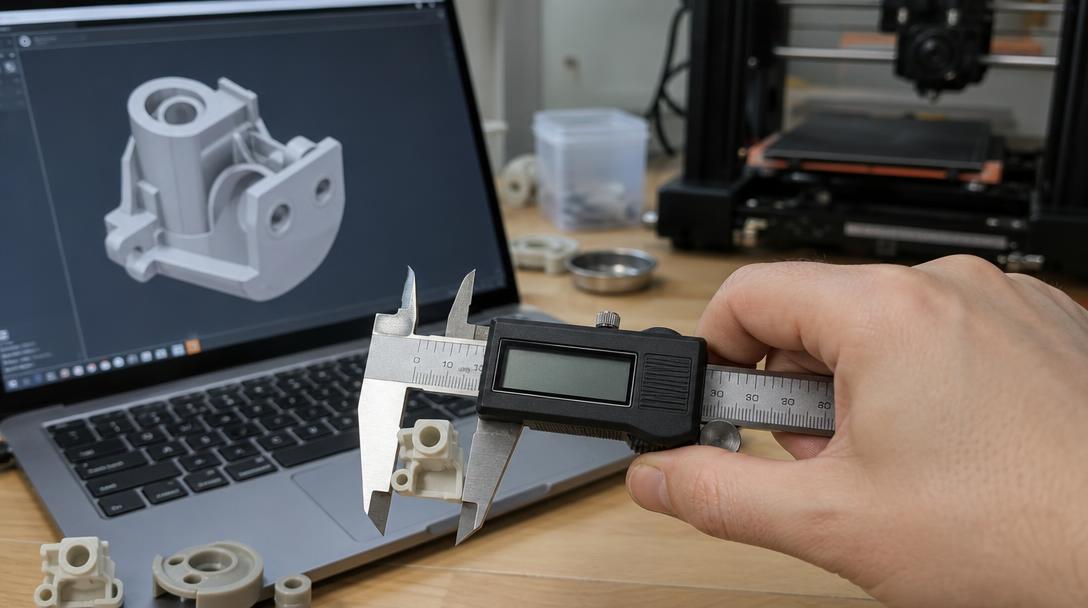
Yes, you can start the 3D printing process without an STL file, but a digital 3D model is needed before the part can be produced. You can use the physical part you have, its measurements, photos or a drawing as a starting point. To help identify the information needed for modelling, it is also useful to explain what the part does and which other parts it connects to.
Why is an STL file needed?
STL is one of the common file formats used to transfer a 3D model’s surface geometry into the print-preparation workflow. Slicing software converts this geometry into layers and movements the printer can follow. Without a file, the printer cannot determine the part’s shape, dimensions or holes, so the model must first be created or an existing one found. Other 3D file formats can also be used besides STL; the right file depends on the model and the production workflow.
Start with whatever you have
Depending on how the part will be used, different references may be helpful:
- A copy of an existing part: If you still have the part, its width, height, thickness, hole diameters and connection points can be measured. Photos taken from several angles can also help show its shape.
- A broken or missing part: Share any remaining pieces, a matching part, or photos and measurements showing where the part fits. A broken surface alone may not reveal the original dimensions; the mounting location and mating parts should also be considered.
- A new design: A hand-drawn sketch, a dimensioned technical drawing or a rough sketch can provide a starting point. Include details about how the part will connect to other components and what loads it will need to withstand.
It is often not possible to determine a part’s exact dimensions from a photo alone. Including a scale reference in the photo and providing critical measurements separately reduces the risk of modelling errors. If the part fits into a mechanism, clearance and tolerance should also be included in the design. If possible, take photos in good lighting from several angles, with a ruler or other scale placed next to the part. This makes it easier to understand its shape and approximate dimensions.
How can you tell if a model is ready for production?
It is not enough for a model to look right on screen. The print orientation, wall thickness, hole and fit dimensions, and support requirements should all be checked. For parts that fit together, making a small tolerance test piece can help you check the fit before printing the full part. To learn more about these considerations during the design process, see the tolerance guide for interlocking parts.
If the part is a replacement component for a device, the material should also be chosen based on its operating conditions. Heat, impact, flexing and outdoor exposure can make the same material unsuitable in some situations. For example, to clarify the measurements and operating conditions of a broken plastic part, you can review the information on the broken plastic part 3D printing service page. For safety-critical or load-bearing parts, the suitability of 3D printing should be assessed separately.
What to do once the file is ready
Once the model has been created, its suitability for slicing and production is checked. If you have an STL file, you can discuss preparing it for printing with the team via an online 3D printing request. If you don’t have a file, mention this in your first message and share any measurements, drawings or photos you have, along with an explanation of what the part does. This helps identify sooner what additional information may be needed for modelling. If the part works together with a matching component, include that component’s measurements and connection details too; a model based only on external appearance may not fit correctly during assembly.
In short, not having an STL file ready is not a barrier on its own; the right references and measurements provide a starting point for creating a model suitable for 3D printing.



 Türkçe
 العربية
 Русский
 فارسی
فارسی Deutsch