How Many Walls Should You Use in 3D Printing? A Practical Guide to Strength
In 3D printing, wall count directly affects the thickness of a part’s outer shell and, for many functional parts, its strength. For general use, two or three walls are a good starting point; load-bearing areas or those around screw holes may need more walls, depending on the design. Increasing the infill percentage alone is not always the most effective solution.
What does wall count change?
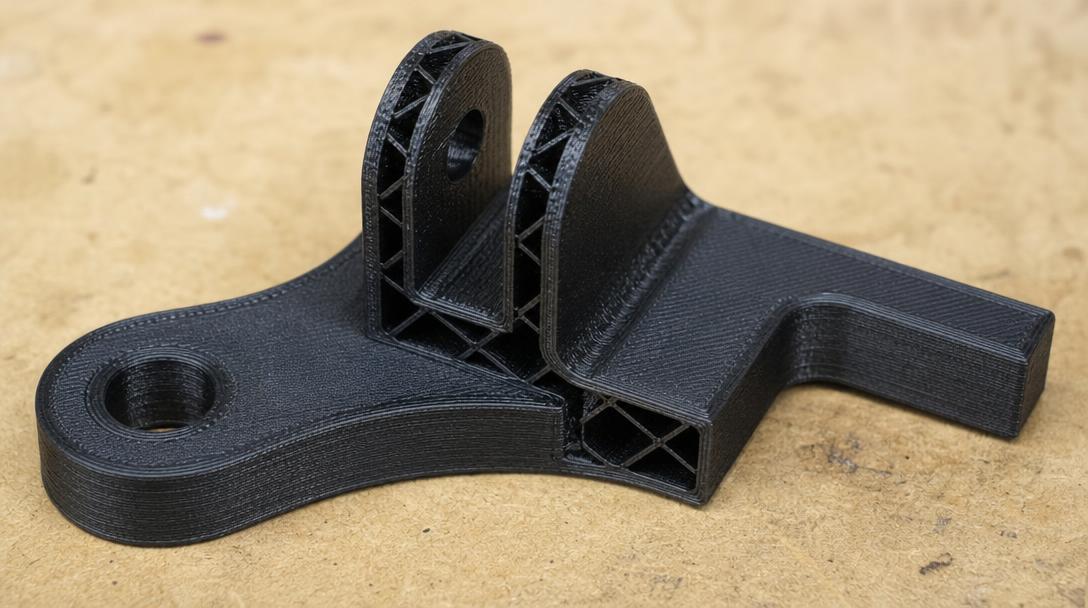
The setting shown in the slicer as “wall,” “perimeter” or “perimeters” determines the number of lines that form the part’s outer contour. Together with the nozzle width, this determines the approximate thickness of the outer shell. For example, with a line width of about 0.4 mm, three walls can create a shell approximately 1.2 mm thick; the actual result depends on the profile and geometry used.
Walls matter especially in thin sections, clips, connection points and screw holes. A thicker shell can help when the load is transferred through the part’s outer surface. However, the model’s shape, print orientation, material and layer adhesion also affect the result; wall count alone does not guarantee strength.
Two, three or four walls: which should you choose?
- Two walls: A starting point that limits material use and print time for visual prototypes and simple parts subject to light loads.
- Three walls: A balanced choice for general-purpose enclosures, fixtures and parts subject to moderate use.
- Four or more walls: Worth testing around screw holes, thin protrusions or areas subject to repeated force. Check with a test print whether the increase actually benefits the design.
These are not fixed rules. In a thin part, there may be less room for infill; in thicker sections, increasing the outer shell may make more sense than raising the infill percentage. When deciding, assess the guide to infill percentage and internal part structure alongside the wall setting.
For strength, walls or infill?
Infill supports the inside of a part, while walls form its outer shell. That is why you need to consider the surface where the load is applied and the part’s cross-section. If a wide, thin plate is bending, print orientation and wall structure may be more important. If a bulky part needs internal support, the infill pattern and percentage also matter. Increasing both settings can make the part heavier, extend print time and raise the cost.
For a load-bearing part, first determine its orientation in use and where the force will be applied. Then print a small test piece in the same orientation and check for cracking, layer separation or excessive flex. You can explore in more detail how print orientation affects strength in the print orientation guide.
How do you find the right setting?
- Identify which surfaces will be subject to force and which areas are thin.
- Start with three walls for general use; compare a four-wall test print for critical areas.
- Print the test pieces using the same material, orientation and basic settings, changing only the wall count.
- Check the result under conditions close to the actual load in use. For safety-critical parts, a test print does not replace adequate design or engineering validation.
If you already have a model, you can share its geometry and intended use before production to assess a suitable approach as part of the 3D printing service. The best wall count is the one validated for the part’s load and design.




 Türkçe
 العربية
 Русский
 فارسی
فارسی Deutsch