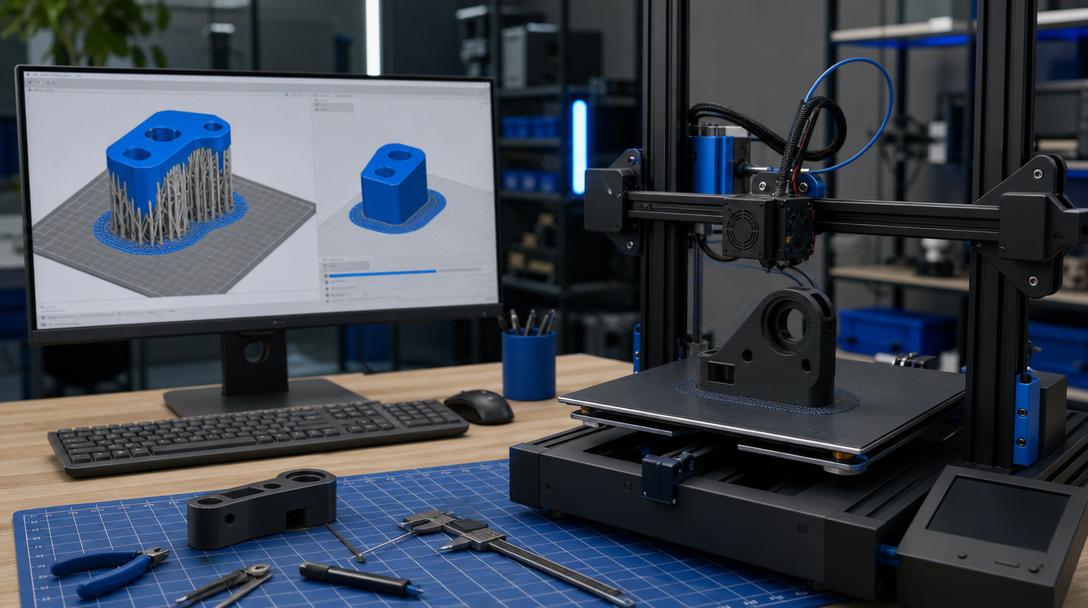
A New Step for FDM Slicer Settings: What Does UltiMaker Cura 5.13 Bring?
On the FDM slicer settings front, one of the most notable developments of June 2026 was the Cura 5.13 update that UltiMaker announced on 1 June. According to the framework the company shared, this release focuses specifically on areas that directly affect print preparation, such as support structures, brim behaviour and material profiles; this means a more predictable workflow for teams producing prototypes, fixtures and low-volume parts.
Why is Cura 5.13 considered important?
In the desktop and professional FDM ecosystem, most users tend to attribute print quality solely to the printer or the filament. In practice, however, the critical link that determines the result is often the slicer. How supports are generated, how much adhesion margin is given to the base, and how accurate the chosen profile is for the selected material all have a serious impact on both the part surface and the total production time.
For this reason, updates like Cura 5.13 should not be read merely as “a new version is out” news, but as an improvement that directly affects results in the field. Especially for thin-walled prototypes, geometries that require support, and parts where post-print cleanup matters, the right slicing settings can save both time and material.
- An updated tree support approach strengthens the expectation of more controlled support generation on complex geometries.
- Better brim behaviour can improve first-layer adhesion and reduce the risk of a print failing from the start.
- New or updated material profiles can offer more consistent starting settings depending on the filament choice.
What does this news mean for an Ucuz3D customer?
Since the focus at Ucuz3D is on producing functional parts, prototypes, enclosures and spare parts with FDM, the real value of such a software update emerges not in theory but in practice. For example, on an enclosure part with high support requirements, an assembly fixture or a low-volume prototype, the right slicer setting can affect surface cleanliness, dimensional consistency and print time together.
Material choice also plays a big role here. When choosing based on your part’s strength, temperature or flexibility needs, it is worth reviewing our 17 material options; because a good profile delivers real advantage when combined with the right material. If you already have a ready model and are planning fast production, you can submit your part directly for evaluation through the request a quote now page.
On which parts can the impact be more visible?
The impact of improvements like those in Cura 5.13 is felt most in these types of jobs: prototypes with sensitive bottom surfaces, presentation models that must look clean after support removal, long parts where bed adhesion is critical, and trial prints that require fast switching between different filament profiles. In short, the value of this news lies less in a new feature and more in its potential to reduce uncertainty in print preparation.
At this point, the relationship between design and slicer should be considered together. To reduce the amount of support or achieve a cleaner surface, it is important not only to adjust the software but also to design the model in a way that suits printing. So if you want to look at the subject more deeply, the What Is a Slicer and What Is It For? guide in the Ucuz3D Knowledge Center makes a good complement.
Conclusion
UltiMaker Cura 5.13 stands out because it touches setting areas that look small but can affect daily print quality in the FDM production flow. Especially every improvement on the support, brim and profile side can mean fewer trials and cleaner results in many jobs, from prototypes to functional parts.
If you too want to see how a print-ready model can be produced more accurately, or to clarify the right FDM approach for your project, you can get a quick evaluation by sharing your file.



 Türkçe
 العربية
 Русский
 فارسی
فارسی Deutsch