What Is Pillowing? FDM Top Layer Problems and Solutions
Getting a smooth top surface in FDM printing can sometimes be challenging, especially on thin-walled or large flat-surface parts. Small holes, dents, or a wavy texture forming on the top of the part — which is called pillowing — So what is pillowing and why does it happen? This problem is usually caused by insufficient top layers or a mismatch between the infill and the top surface. In this article, we explain the causes of pillowing and how to prevent it with correct layer settings, step by step.
What Is Pillowing?
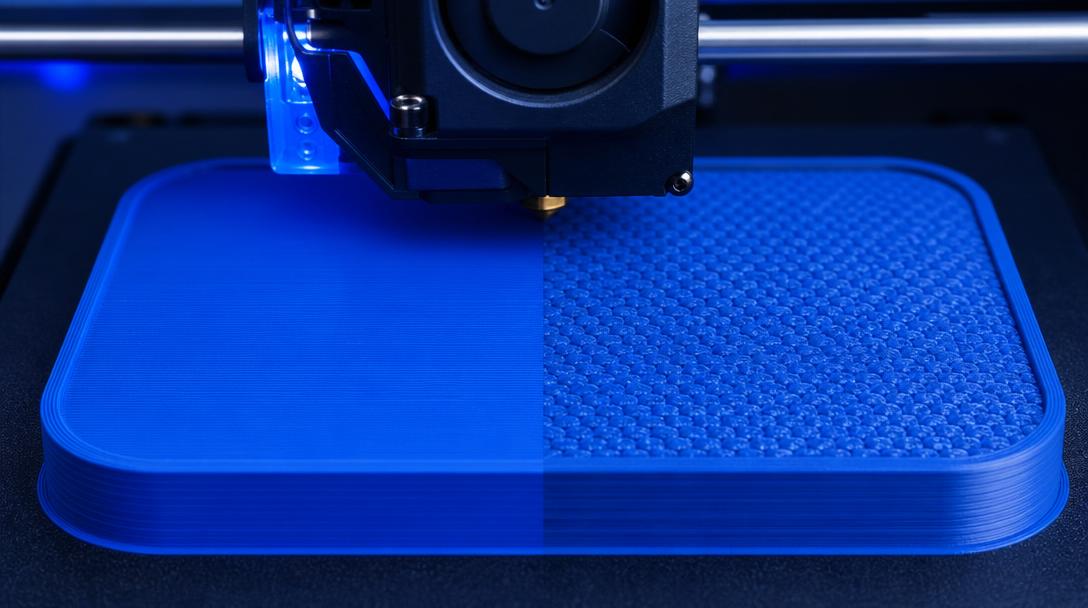
Pillowing is a pitted, wavy appearance on the top surface of a part, caused by the infill pattern showing through. When the top layer(s) cannot bridge the infill gaps beneath, the molten filament falls into these gaps, creating sunken spots instead of a flat surface. This is especially noticeable on large flat surfaces, with low infill percentages, and insufficient top layer counts.
Why Is Top Layer Count Critical?
The top layers setting in your slicer determines how many layers thick the top of your part will be printed as solid and uninterrupted. For example, at 0.2 mm layer height, 4 top layers mean a fully solid roof approximately 0.8 mm thick. Insufficient top layers lead to the following issues:
- Pillowing: Infill gaps are visible from above, the surface becomes wavy.
- Surface holes: The molten filament falls into gaps, especially with open infill patterns like gyroid or honeycomb.
- Loss of strength: A thin top surface can collapse or crack under pressure.
How to Determine the Right Top Layer Count
The ideal top layer count depends on your layer height, infill percentage, and nozzle diameter. A practical rule of thumb: the total thickness of the top layers should be at least twice the nozzle diameter. For a 0.4 mm nozzle, this means roughly 0.8 mm of top surface thickness. Recommended values by layer height:
- 0.12 mm layer: 6-8 top layers (0.72-0.96 mm)
- 0.20 mm layer: 4-5 top layers (0.80-1.00 mm)
- 0.28 mm layer: 3-4 top layers (0.84-1.12 mm)
If the infill percentage is below 15%, increasing the top layer count by one usually prevents pillowing. Additionally, infill pattern also matters: 3D patterns like gyroid provide better support to the top surface compared to planar patterns like grid or triangles.
Additional Tips to Prevent Pillowing
- Increase infill percentage: 15-20% infill significantly improves top surface quality for most parts. Pillowing is largely eliminated without needing a fully solid print.
- Also check bottom layer count: By the same logic, bottom layers should be at least 3-4 for bed adhesion and surface quality.
- Optimize the cooling fan: Increasing fan speed on top layers helps the filament solidify faster and reduces drooping into gaps. 80-100% for PLA, 40-60% for PETG is the ideal range.
- Try the ironing feature: The ironing setting in your slicer lightly smooths the top layer with a hot nozzle, giving it a glass-like finish. Although it increases print time slightly, it’s an effective method for visual quality.
With the right top layer count and slicer settings, you can achieve factory-quality surfaces on your FDM prints. If you’re experiencing pillowing on your own parts, try increasing the top layer count and reviewing the infill percentage first. To get a professional result or see your printing cost in advance, you can calculate your instant price and benefit from our 3D printing service with settings optimized for your project. For more detailed information on slicer settings, you can also check out our infill ratio guide.


 Türkçe
 العربية
 Русский
 فارسی
فارسی Deutsch