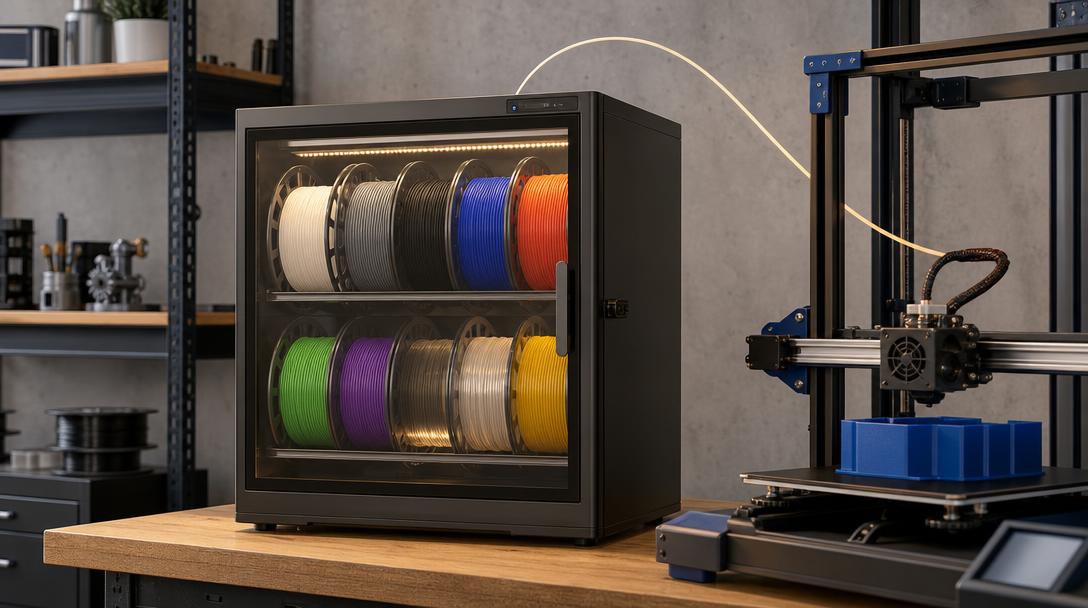
SUNLU and INSLOGIC FilaDC i10: A New Cabinet Aiming to Keep Filament Dry Without Heating It
In FDM printing, failed results are not always caused by printer settings. Especially when moisture-prone filaments such as PETG, TPU, and Nylon (PA) are left exposed, stringing, weak layer adhesion, surface inconsistency, and extrusion problems can occur. SUNLU and INSLOGIC announced the FilaDC i10 filament dehumidifying cabinet, which aims to address this problem with a continuous storage approach before and during printing.
The development was reported in the news article published by VoxelMatters on September 1, 2026. The same product was also covered by 3D Printing Industry with a focus on filament storage and humidity management. For that reason, this is not just a new accessory launch; it can also be seen as a practical example of how material preparation and storage habits may change in workshops that use many spools.
How does the FilaDC i10 work?
Conventional filament dryers mostly use direct heat. This method can help reduce moisture before printing; however, when managing different materials at the same time, the proper drying conditions for each filament must be taken into account. The FilaDC i10, on the other hand, aims to circulate the air inside the cabinet at room temperature through a drying system containing a molecular sieve. Moisture is captured by the desiccant; when saturation is reached, the system automatically regenerates this component.
The product’s sensors monitor humidity and temperature inside the cabinet and manage the dehumidification and regeneration cycles. The report also states that it offers quiet operation, a lower surface temperature to the touch, and a PTC heating module for protecting the electronics and hardware. The important distinction here is this: the heating module is not used to keep the filament spool continuously drying at a high temperature, but to regenerate the system that captures moisture.
Which workshops could it make sense for?
The FilaDC i10 is aimed less at hobby users who occasionally use a single spool and more at production environments that regularly keep multiple materials open. If print farms, design offices, makerspaces, and prototype workshops work with materials such as PETG, TPU, and Nylon at the same time, drying and cooling each spool, protecting it during printing, and resealing it afterward can create a significant workflow burden. A cabinet like this has the potential to automate that process.
The source states that the cabinet can hold up to ten one-kilogram spools and that the target humidity range can be adjusted. However, these features do not mean there is a single universal setting for every filament. The material data sheet and the manufacturer’s recommendations for drying and storage should still be checked; especially for highly moisture-sensitive materials such as Nylon and TPU, pre-print preparation should be verified separately. A closed cabinet is also not a guarantee of print quality: if the nozzle, bed, temperature, flow, and print geometry are not set correctly, problems may continue.
Decision logic for filament storage
If your only need is to protect a few spools, an airtight box and a suitable desiccant may be a simpler solution. If you produce with different materials throughout the day, frequently load and unload spools, and face repeat prints caused by moisture, an actively humidity-managed cabinet may provide greater operational benefits. When making your decision, evaluate capacity, sensor monitoring, noise, ease of feeding filament from the cabinet to the printer, and material compatibility together; do not focus only on the fact that the product is new.
On Ucuz3D’s our printing materials page, you can review FDM filament options and get a 3d printing service that suits your needs. If you want to see affordable 3d printing prices for your part and understand the per-gram pricing logic, check the production page; with the online 3d printing tool, you can upload your model and start the instant pricing process.
When evaluating a new humidity management device, first measure your own printing workflow: how many spools are left exposed, which materials are dried more often, and how many print repeats are caused by moisture? These questions are the healthiest way to understand whether the equipment investment truly delivers quality and time savings.




 Türkçe
 العربية
 Русский
 فارسی
فارسی Deutsch