How to Design a 3D-Printed Replacement Part for a Broken Plastic Component
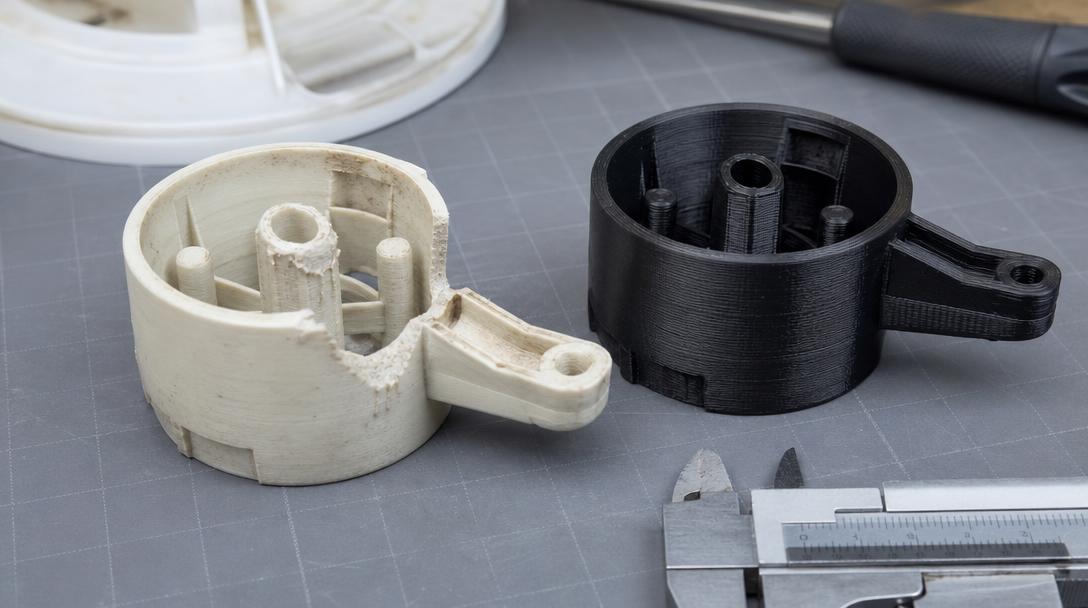
When designing a functional 3D-printed replacement for a broken plastic component, first determine how the part works, what loads it must bear, and how much clearance is available around it. Simply copying the old part’s outer shape is often not enough; connection points and moving surfaces must also be measured. Before you start designing, note the conditions in which the part will be used and the cause of its failure.
First, inspect the part’s function and damage
Clean the broken part and inspect the sections that remain intact. Does it hold a cover, rotate a lever, or keep two components in a specific position? Its function shows which areas should be prioritised in the design. For example, in a snap-fit connection, the tab’s thickness and the distance it can flex are important; in a rotating connection, the shaft diameter and bearing clearance matter.
If you have both halves of the damaged part, bring the broken surfaces together to get an idea of its overall shape. However, do not use the broken surface alone as a measurement reference: impact, wear, or material loss may have changed the original dimensions. The housing where the part fits, screw holes, and mating components provide more reliable measurement points.
Take measurements from functional reference points
Use calipers to measure the outer dimensions, hole diameters, channel widths, and distances between connection points. Do not measure from just one direction; also record the part’s thickness and any stepped surfaces at different heights. Taking photos with a ruler or an object of known size can make it easier to model the part later, but do not use photos as a substitute for precise measurements. Recording measurements on a drawing helps prevent you from mixing up different surfaces while modelling.
The slot the part sits in, or the surface it contacts, should also be included in your measurements. Print tolerances and the level of detail your printer can produce can create differences between the design and the physical part. For this reason, testing tight fits in a controlled way can reduce the risk of having to reprint the entire part. To refine your design approach, see the tolerance guide for interlocking parts.
Choose the material and print orientation for the conditions of use
Consider the environment where the part will be used: sunlight, temperature, moisture, oil, or repeated impacts can all affect your choice of material. The direction of the force on the part also matters. In FDM printing, strength may differ between layers and within the layer plane, so avoid orienting the part in a way that makes the layers easy to separate under load. Print orientation can also change the need for supports; when deciding, take the effect of print orientation on part strength into account.
Because this is a component of an object, it is not enough for the material alone to be “durable”; the geometry must be right, and the conditions of use must be suitable too. Especially for safety-critical parts or parts whose failure could damage other components, do not consider a printed prototype to be the final part without an expert assessment. Subjecting a replacement part to greater loads than the original does not mean the design is safe either.
Print a small test first, then the full part
If a connection dimension is critical, prepare a short test model that includes only that area. Check whether it fits into the slot, aligns with the screw or pin, and has enough clearance at moving connections. Adjust the dimensions in small increments if needed. This method can reduce wasted material and time, particularly when recreating old or discontinued parts.
If you cannot model the part yourself, you can share its dimensions and usage details to assess its suitability through the replacement-part 3D printing service for a broken plastic component. Once the model is ready, check the estimated cost of the file with the 3D printing price calculator.



 Türkçe
 العربية
 Русский
 فارسی
فارسی Deutsch