How to Fix Overhang and Bridge Problems in 3D Printing
Two of the most common issues beginners run into in 3D printing are overhang (overhanging surface) and bridge printing errors. When the underside of a part is left hanging in mid-air, the filament sags into the gap, producing unwanted stringing, rough surfaces or completely failed prints. Fortunately, there are proven methods to solve these problems.
What Is an Overhang and Why Does It Happen?
An overhang occurs when a layer extends further out than the layer beneath it. Angles greater than 45 degrees cause the filament to hang in the air and sag. Overhangs between 60 and 90 degrees, in particular, cannot be printed without support. The result: drooping edges, poor surface quality and print failure.
Methods to Solve the Overhang Problem
- Use support material: Your slicer software (Cura, PrusaSlicer, Orca Slicer) can add supports automatically. Tree supports use less filament than standard block supports and are easier to remove.
- Orient the part: Rotate your part on the build plate so that overhangs are minimized. Sometimes a 45-degree rotation eliminates the need for support entirely.
- Increase cooling: A good part-cooling fan lets the filament solidify quickly while it is in the air, reducing sagging.
- Lower the layer height: Lower layer heights such as 0.12 mm help overhangs print more cleanly.
- Reduce print speed: Dropping the speed to 20-30 mm/s in overhang areas gives the filament time to settle.
The Bridge Problem and Its Solution
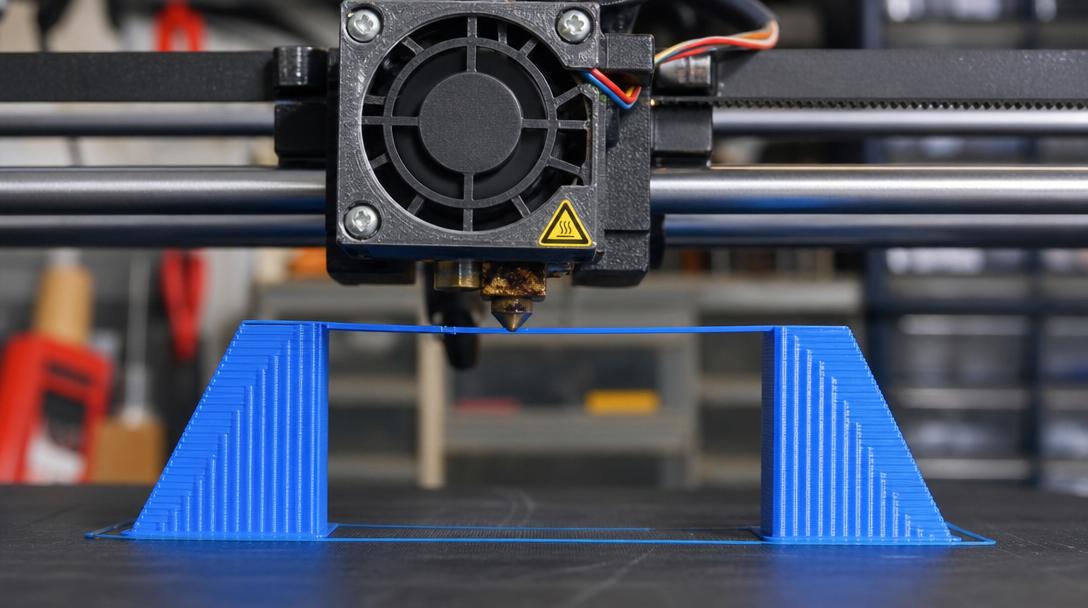
A bridge is a horizontal span that stretches through the air between two points. Unlike an overhang, a bridge is entirely in mid-air. For a successful bridge:
- The bridge length should not exceed 10 mm — longer bridges always require support.
- The bridge fan should run at 100% — the filament must solidify instantly while it is in the air.
- Bridge speed should be low (30-40 mm/s) and the extruder temperature should be 5-10°C below normal.
- For the bridge pattern, try the ‘Brida’ or ‘zigzag’ options in your slicer.
The Professional Solution: Leave It to the Experts
For complex geometries like overhangs and bridges, the best solution is sometimes to use a professional 3D printing service. Experienced operators print complex parts flawlessly using the right support strategy and slicer settings. With affordable 3D printing prices, you can get professional results without straining your budget.
If you would rather not wrestle with slicer settings, send us your complex model through our instant price calculator, and we will print it with the most suitable support strategy and ship it to you.


 Türkçe
 العربية
 Русский
 فارسی
فارسی Deutsch